

Monitor, control, slice, and manage your Bambu Lab printers from anywhere.


Website · Terms of Service · Privacy Policy
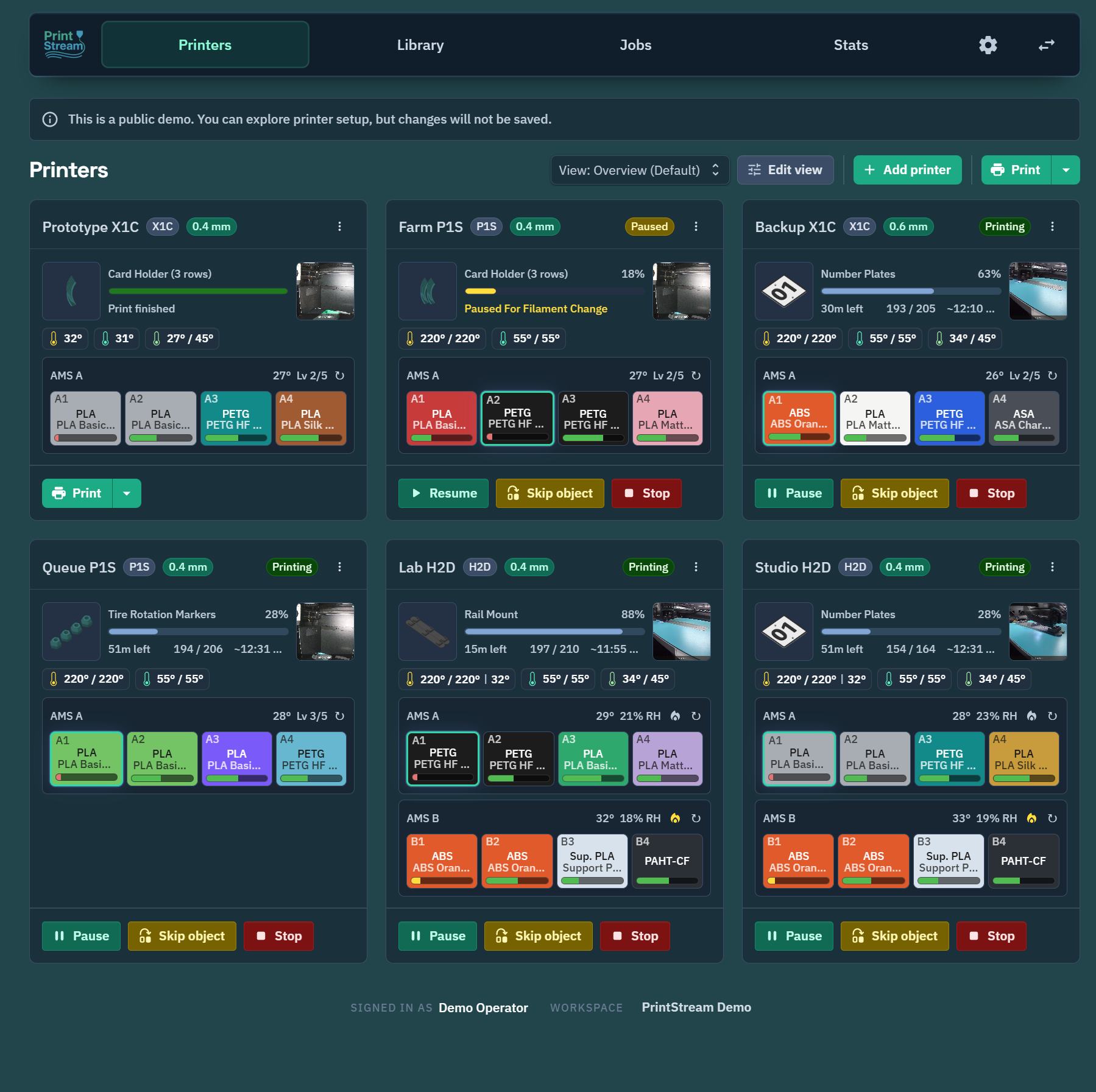
PrintStream runs one Bambu Lab printer or a whole farm from any device. See every printer live, slice and prepare models, and send prints from a shared library, in a browser or in the Android and Windows apps. It works with every Bambu Lab printer model.
- Live dashboard: every printer at a glance, with progress, temperatures, time remaining, AMS contents, the camera, and error alerts.
- Full control: pause, resume, stop, lights, calibration, skipping objects mid-print, and AMS and spool management.
- Shared print library: upload project, G-code, and model files into folders, preview their plates, keep version history, restore from a recycle bin, and tag printers, files, and spools.
- Send prints anywhere: map filaments to AMS slots and queue a file to one printer or many, with checks for printer model, plate type, and nozzle.
- Slice in the browser (optional): a slicer service runs real Bambu Studio and OrcaSlicer versions on the server, so a plain 3MF becomes a printable file without leaving the app.
- 3D editor (optional): arrange models, edit supports and materials, paint colors, and save multi-plate projects.
- Filament tracking (optional): a live spool inventory that counts down as prints run.
- Import from model sites (optional): bring models in from MakerWorld and Printables without a separate download.
- History and stats: print history with snapshots, faults, success rates, print hours, and filament use per printer, with one-click re-prints.
- Notifications: in the browser, on Windows and Android, or by email, Discord or ntfy, with camera snapshots attached.
- Home Assistant: a companion integration brings printers, AMS units, cameras, and dashboard cards into Home Assistant (PrintStreamApp/printstream-home-assistant).
- Multi-user (optional): passkey or single sign-on with roles and permissions, or run it open on a trusted LAN.
- Hosted: the main PrintStream product is the hosted version at printstream.app: the same software run for you, so the only thing you install is the small bridge that talks to your printers.
- Companion apps: PrintStream for Android and Windows, from the store badges above.
- Self-hosted: the public repository is the self-hosted community edition, for running the whole stack on your own hardware. You need Docker and about five minutes:
curl -fsSL https://raw.githubusercontent.com/PrintStreamApp/printstream/main/compose.server.example.yml -o compose.yml
curl -fsSL https://raw.githubusercontent.com/PrintStreamApp/printstream/main/.env.server.example -o .env
# Set POSTGRES_PASSWORD in .env (e.g. to the output of `openssl rand -hex 32`); the stack will not start without it.
docker compose up -d
Then open http://<your-server>:8080. A workspace is created on first start and the bundled bridge pairs itself. Printers need LAN Only Mode with their access code, and newer firmware also needs Developer Mode. Building from source, arm64 hosts, reverse proxies, HTTPS, and every setting are covered in docs/deployment.md and docs/configuration.md.
No telemetry: the self-hosted edition has no analytics, telemetry, or crash reporting. It contacts printstream.app only for the announcements feed, a commercial key's refresh, and the optional cloud features when someone uses them.
PrintStream has two parts. The server is the web app, API, and database, and can run on a home server, a NAS, a Raspberry Pi, or a cloud VPS. The bridge is a small agent on the same network as your printers: it finds them, talks to them over the LAN, and connects out to your server, so no ports need opening at the printer site. On one LAN, both run on one machine with one command.
Optional features are plugins you switch on per workspace: sign-in providers, the 3D model studio, slicing helpers, the print queue, filament tracking, filament calibration, production orders, notifications, firmware updates, maintenance reminders, plate-clearing confirmation, importing models from a link, and the Home Assistant bridge. Third-party plugins can be uploaded from the plugin manager.
- Free for personal use. Self-hosting for personal, non-commercial use is free with a community key, entered under Settings, License. New installs run for 30 days without one; after that, adding printers and starting prints wait for a key, and everything else keeps working with no data locked away. Business use needs a Pro subscription or a one-time Lifetime license.
- Cloud features are optional. Any valid key can use the shared Suggestions board, and a commercial key with support can send Help conversations. The connection never uploads printer, library, history, or camera data, and can be switched off in the plugin manager.
- Prints are guarded. Only
.gcodeand.gcode.3mffiles are sent to printers, hard mismatches are blocked, transfers are retried carefully, and deleted files go to a recycle bin first.
PrintStream controls physical hardware that involves heat, motion, electrical components, and materials. It helps you coordinate and monitor your printers; it does not replace local supervision, manufacturer guidance, machine maintenance, material safety practices, or your own judgment. Always confirm that the printer, plate, toolhead, material, file, and surroundings are safe before starting a print, and respond to errors, alarms, or unsafe conditions.
The software is provided "as is", without warranty of any kind. To the fullest extent permitted by law, the authors and contributors accept no responsibility or liability for any damage, injury, loss, failed prints, material waste, equipment damage, or business interruption arising from its use, whether you run it yourself or use the hosted version. See LICENSE for the full disclaimer, and the Terms of Service for the hosted product.
Day-to-day development happens in PrintStream's private source repository. The public repository is a snapshot of the open core, exported at milestones, so it can sit a little behind the hosted version. Forks, issues, and pull requests there are welcome; accepted changes arrive back with the next snapshot.
- ARCHITECTURE.md: how the pieces fit together
- docs/development.md: local development and testing
- docs/deployment.md: production deployment
- docs/configuration.md: every environment variable
- Devkit: the local development environment, including remote development
PrintStream's source is licensed under the PolyForm Noncommercial License 1.0.0 (see LICENSE), copyright Ryan Ewen (see NOTICE). You may use, modify, and share it for any noncommercial purpose; all commercial rights are reserved, and a commercial license is available from the copyright holder. This is a source-available license, not an OSI-approved open-source license. The in-app license key is the runtime side of the same terms: a free community key covers the noncommercial use this license grants, and a commercial key covers the business use it reserves.
PrintStream bundles third-party software under its own licenses. Attribution and license text for each bundled npm package are generated per distributable (npm run notices) into apps/web/public/THIRD-PARTY-NOTICES.txt (served at /THIRD-PARTY-NOTICES.txt), apps/api/THIRD-PARTY-NOTICES.txt, apps/slicer/THIRD-PARTY-NOTICES.txt, and apps/bridge/THIRD-PARTY-NOTICES.txt; most are permissive, and the notable weak-copyleft ones are occt-import-js (LGPL-2.1, bundling OpenCASCADE) and web-push (MPL-2.0). The slicer service runs Bambu Studio (and optionally OrcaSlicer), licensed under AGPL-3.0, as separate programs at arm's length; their attribution and source offer are in apps/slicer/THIRD-PARTY-SLICERS.md, which ships in the slicer image under /app/licenses.